zSofa 是完全由自己敲出来的,没什么样式,基本算个骨架,好听点就是简约,名字的由来在这里说过《启用新 WordPress 主题: zSofa ( Alpha 版本)》,随便丫丫出来的,同样是“z”开头,好分辨吧,我折腾的主题就叫 z 系吧。
好了,喜欢 zSofa 的朋友下载玩玩吧,主题很小,如果除去 screenshot.png 和 GPL_license.txt 只有 39 KB。没加任何 jQuery ,需要加的朋友可以参照我以前的文章自己加。
Theme name: zSofa
Current version: 1.0.8 (2010.6.9 Update)
Description: White and simply, Designed and created by zwwooooo. It is a simply WordPress theme without any plugins needed (support plugin WP Page Numbers, WP-PostViews, wp-utf8-excerpt, Related Posts of Simple Tags), widgets, threaded-comments, theme-options supported. Valid CSS3 & HTML. Facebook and twitter link-icon manage supported in the theme option page.
Tags: theme-options, threaded-comments, white, two-columns, fixed-width, right-sidebar
The CSS, XHTML and design is released under GPL: http://www.opensource.org/licenses/gpl-license.php
简单说明:
- 评论支持嵌套,设计是无限嵌套,但为了样式好看,建议开到 5 层。
- 不需要任何插件即可使用。
- 内置评论表情的了,用的是 willin 的简单表情代码,这里感谢一下。
- 内置了几个插件的调用代码:WP-PostViews、WP Page Numbers、Simple Tags (Related Posts)
- 建议安装插件除了上面的 3 个,还有:wp-utf8-excerpt 或者 WP Kit CN
- 只在 Firefox 3.5/3.6、Opera 10.x、Chrome 3/4、IE6/7/8 下测试,样式基本一样。
Download: 各版本下载 ( from google code ) | 官方主题目录 ( WP theme directory)
Demo | 演示: zSofa
更新日志:(倒序)
2010.6.9 Update
* 修正comments.php的&&为html码
* 修正搜索框在IE/Chrome下宽度问题
* 修正 wp_list_pages() 参数* Fix: comments.php && -> &&
* Fix: Search box in the chrome/ie
* Fix: wp_list_pages () parameters2010.3.29 Update
更新到 1.0.7(英文更新 log 来自 Google 翻译,不准确很正常请忽略)
- Adding theme-options: Facebook and twitter link-icon manage supported in the theme option page.
- Change the default date format for post
- Any details of the changes
具体更新请到《WordPress 主题 zSofa 更新至1.0.7版本》
2010.2.9 Update
主题终于给 WordPress 官方主题目录收录了,这次提交比较麻烦,有兴趣点这传送门
版本已到 1.0.6,更新内容如下:
- 把函数 zsofa_recentcomments() 和 zsofa_hotposts() 都删除了,既然官方在意那些代码就删除吧,反正这些功能可以用小工具实现,或者自行手动添加代码。
- 把用来兼容 ie6 的第三方兼容 js 去掉了:其实也就是为了页面导航能下拉,我的页面导航下拉是用 css 实现的,该死的 ie6 竟然不支持,因为懒所以直接用第三方兼容 js 让 ie6 兼容,算了,有子页面的朋友自行添加吧。
(英文更新 log 来自 Google 翻译,请不要笑我)
- Removed Function: zsofa_recentcomments() and zsofa_hotposts(), Because these features can be added a widgets to achieve.
- Removed the "loading code from a 3rd party site" in footer.php, If you need to add this code to compatible with ie6, add your own.
2010.2.4 Update
再次修改主题提交 WP 官方,这次不知能否通过审核,版本为 1.0.5
Change log:
- 修正一些重叠 bug(其实不算 bug ,只是在很多文章分类和标签时会出现重叠,没办法,官方要求)
- 去掉头部的文章分类导航,只留页面导航。
- 修改了 css,为了更好的兼容 IE,特别是 IE6
(下面的英文 log,来自 Google 翻译,大家不用笑我,笑 Google 吧)
- Fixed some bug: e.g Categories overlap...
- Modify the header style.
- Modified the css, better compatible with ie
2010.2.2 Update
更新到 1.0.4 修正了一些错误,提交 WP 官方主题目录审核失败。
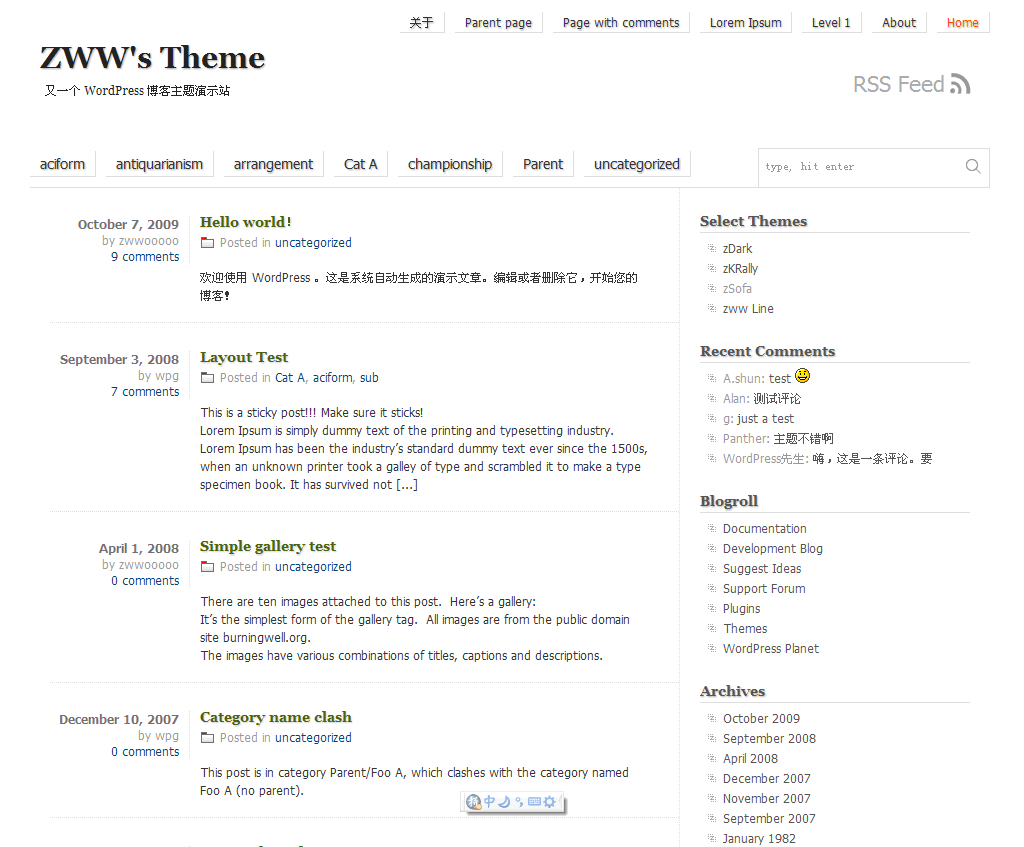
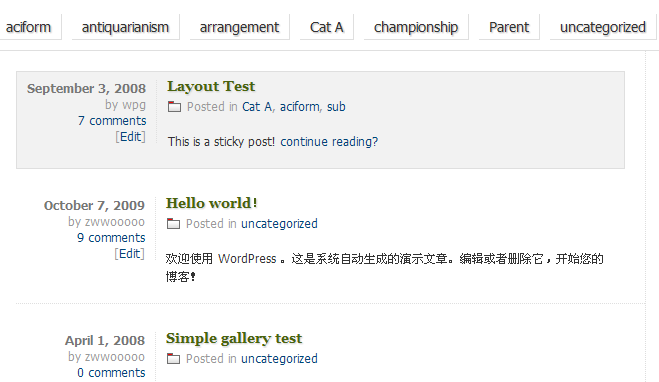
样式图片欣赏
首页样式:
置顶文章样式:
文章页面样式:

评论嵌套样式:

附:
z 系主题可以在这里全部找到:
http://code.google.com/p/zww-wp-theme/
已提交 WordPress.org 的主题:
http://wordpress.org/extend/themes/profile/zwwooooo
相关文章:
https://zww.me/archives/category/wordpress/my-theme-wordpress
主题演示地址:
http://demo.zwwtheme.com/
欢迎围观!

- 本文标题:WordPress Theme: zSofa
- 本文链接:https://zww.me/archives/24846
- 发布时间:2010年01月29日 16:00
- 版权声明:除非注明,文章均为 zwwooooo 原创,转载请以链接形式标明本文地址!

算是公测么 似乎没发现BUG 呵呵
@sosohehe 貌似没bug,剩下的以后细节处理一下即可。没什么公测不公测,要得就用。
真好,将来给宝宝开博就用z大的这个主题
@mytion

主题不错,现在的主题不想换了,要是再开博就用这个主题
@瑜际 呵呵,欢迎使用
依然军绿啊~很 不错。
不错。
@阿修 军绿色舒服啊
这皮肤可是相当的简洁,就喜欢这样的,谢谢分享。。
每次做的主题都很漂亮,很顺眼.
哈哈,看着很专业哦.
嘿嘿~不错不错~支持个

想问个问题哈 为什么WP的主题都不是文章新窗口打开呢 那样做是不是有什么不好的啊
@球犯 因为看所有文章的(或者几篇文章)的人都不多,况且浏览器本身就有新窗口/新标签打开链接的功能,何须多此一举呢?而且很多人不太喜欢打开很多窗口或者标签。不过你觉得需要新窗口打开链接是很简单的,加个参数即可。
额..还有 1.0.5为什么下载地址 Not Found 啊..
@球犯 Sorry,忘了上传了 ,就去上传
,就去上传 
貌似换主题了~赞一个!
这个主题 ,不错 我喜欢这么简洁的,要不是我上一款那个用的时间太久了 我就用你这个了。
@countmeon 荒淫使用
虽然用的WP,虽然知道它功能之强大,但还是不了解它
@北方熊之舞 我也不了解,我们只是用而已
@zwwooooo 谦虚了,我连用都用不全面滴~
好简洁,继续收藏~
真厉害,主题一个接一个出来,我来取经了。
@华晨 不多,没有精品,瞎折腾而已
@zwwooooo 我在做自己博客样式的时候感觉怎么做都不好看,花的时间最多的还是在样式上面,有什么样式设计的好多建议么?
@华晨 没有,我只是玩玩,你得自己找灵感,没有灵感可以看看别人的主题
很简洁哦!
拿来用用了。嘻嘻~
@柳城 荒淫使用
笨笨又来了,嘿嘿,顺便问候博主也顺便问候piaoboyizu.com 6号的又更新了。。
我再来就只有水一下了~~~
这也太简单了点吧 呵呵
@秦大少 就是这么简单,骨架
好简洁的主题,嘎嘎,不过我就是喜欢简洁。
@真好网 提交官网遇到问题,现在我修改的更简洁了,囧
-----------------------------------------------------------------------
温馨提示:www.piaoboyizu.com 每天24:00点准时更新,雷不完的经典品不完的寂寞!
@笨笨 : 你每次来就是卖广告么?继续会给spam的